From the iPhone 5s, the Apple mobile incorporates a coprocessor in your hardware that is in charge of recording our activity daily. Counting the steps we take is one of the functions of the M7 and M8 chipsets that we find in the iPhone 5s and iPhone 6 respectively.
Although it was shown that the battery consumption of this coprocessor is minimal, it is still one more element that contributes to draining the autonomy of the iPhone so if this option is not useful for you or you have another quantifier, you may be interested disable iPhone activity log.
How to disable activity log on iPhone
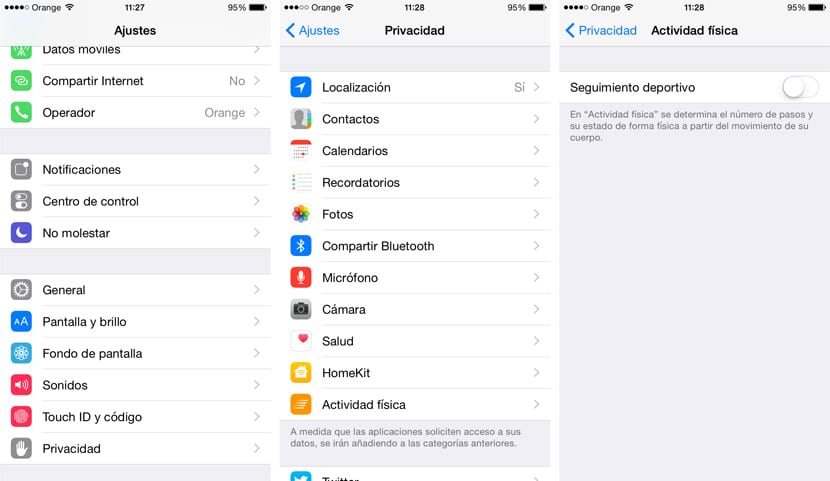
For the iPhone coprocessor to cease its task and stop recording our daily activity, we simply have to access the Settings> Privacy> Physical activity application and once there, We deactivate the option "Sports monitoring".
Surely, the impact of deactivating this option on autonomy will be minimal But as I said before, the fewer processes there are in the background, the more battery minutes we will be able to scratch each day.
There are many activity quantifiers that have passed through my hands and of all of them, iPhone is one of the most accurate for the simple fact of carrying it in your pocket. The bracelets always end up falsifying the data since it is inevitable that in certain daily movements, the quantifier translates them as steps when it is not, however, that does not happen with the iPhone.
Now that the Apple Watch will be on the wrist of many of you, surely you will not be compensated by the activity log through the iPhone if the watch is going to do the same function.